

Learning About the Video Camera on Drone
Learning About the Video Camera on Drone
This Article will help you all about Drones | Source : Pocket Lint
Click here to View Best Drones Range | Click Here to Buy Best Selling HD Camera Drones
If you didn’t select a drone with a built-in camera, you will need to get a video camera that will provide the best image quality for its size and weight. The GoPro Hero3 Black Edition is the standard when it comes to aerial videography and photography. It weighs only 73 grams and can record video (2,704×1,524 pixels) at 45Mbps. It also features built-in Wi-Fi for downloading your footage and maximum compatibility with OEM and third-party accessories. But you don’t need fancy cameras for aerial photography as long as you ensure there is no vibration, because that’ll completely ruin your footage quality. Vibration can come from the drone, its engine, and air turbulence.
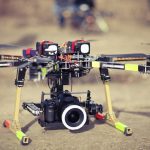 Small drones bounce around a lot, for instance, so you’ll need to use vibration isolators and gimbals (more on this later) to eliminate the possibility of vibration. Fast lenses that are sharp at large apertures will help too. Stabilised aerial video is made possible with the inclusion of gimbals. A gimbal is a support that allows the rotation of an object around an axis. Note that a gimbal with a brushless motor can provide greater power-to-weight ratio. Gimbals for GoPro cameras are available for as little as $150 and can simply be bolted to the bottom of any aerial platform. The Zenmuse gimbal is a popular example.
Learning About the Video Camera on Drone
You can’t truly experiment with drone aerial photography without getting a few other bits and bobs. You may want to see where you’re flying while steering a drone from the ground, for instance. To do this, you can use something like a video transmitter, such as the Immersion RC 5.8ghz 600mw, which greatly increases the range of a 5.8GHz link, and then you can pair it with a Duo5800 or Uno5800 receiver on the ground to get noise-free video.